
AI-Assisted Visual Workflow Testing: Evidence and Limits
Use OpenFactory to exercise a GUI workflow in a tester VM, preserve screenshots and video, and combine visual reasoning with deterministic assertions and human review.
By the OpenFactory Team · June 15, 2026
Describe a workflow and OpenFactory can exercise it in a tester VM, preserve screenshots and video, and return a run-level verdict. Visual reasoning is probabilistic: review the evidence and retain deterministic assertions for contracts that must be exact.
Traditional UI tests are written against the skeleton of your app: this CSS selector, that DOM id, this element index. They are precise and they are brittle: rename a class, reorder a layout, swap a component library, and a green suite turns red even though nothing a user cares about broke. Teams respond by spending more time maintaining tests than writing features, and eventually they stop trusting the suite at all.
OpenFactory adds another path. It can look at the rendered screen, choose an action, and inspect what follows. That helps cover visible workflows and reduces selector authoring, but it does not make the result deterministic. A sound suite uses visual runs alongside DOM/API checks, accessibility tooling, security tests, and human review.
Ask for a test, get a verdict
The headline tool is test_workflow. You give it a goal in plain language and it returns a run id right away, then works through the task in the background while you poll for the result. Under the hood it runs a tight perception → reasoning → action loop: capture the screen, reason about what is there and what to do next, take the action, and repeat until the goal is met or a step fails. Before it ever navigates, it checks that the target URL is actually reachable, so a broken deploy fails loudly instead of silently testing the wrong page.
Please test the booking flow on my staging site.

Open the booking page, pick the first available slot, fill in a test
name and email, submit, and verify the confirmation screen shows a
booking reference. Record a video and give me the verdict.Assertions that see the screen
A test is only as good as its checks. Matching raw text gets you part of the way, but plenty of UI states have no convenient text to grep: a button that should be enabled, a chart that should have rendered, a modal that should have appeared. OpenFactory adds a visual gate: image recognition can run over screenshots so you can assert semantic states like “the Sign In button is visible” or “the dashboard loaded.” It judges both terminal-style output and graphical windows. Treat the result as one signal: blank frames, animation, occlusion, model error, and ambiguous UI can still cause false passes or false failures.
Saved scenarios can reuse resolved elements
Reasoning about every screen on every run can be slow. A saved scenario therefore keeps a resolved-element cache. The first time it runs, it resolves each step the careful way: find the element, confirm it, remember where it was and what it looked like. On later runs it replays from that memory in milliseconds and only drops back to full reasoning for the specific steps whose cached target no longer matches. Cache reuse can reduce repeated parsing, but it does not promise a fixed runtime or eliminate flakiness. This mechanism belongs to saved scenarios, not the separate one-off test_workflowagent loop.
A video you can scrub by step
When a test fails at 2 a.m., a red checkmark is not enough: you need to see what happened. Every run can be recorded as video, and the recording carries a seek marker for each step. Open the report, click a step in the list, and the player jumps straight to that moment. No more squinting at a wall of logs to reconstruct the failure: you watch it. The report also embeds the per-step screenshots and the verdict notes. Saved-scenario reports are private by default and can be made public explicitly; review them for secrets before sharing.
Real apps mean real logins
Most workflows worth testing sit behind a sign-in, and modern sign-ins often mean a one-time code. A test can fetch that code from a connected mailbox at run time and type it in. This requires an active managed Gmail connection and a dedicated test account is the safer default. Saved scenario secrets can live in the platform key store; one-run overrides are not persisted. Do not put credentials in prompts, screenshots, or shareable reports.
Why seeing beats reading the DOM
It is worth dwelling on why this approach is sturdier, because it changes what a “passing test” means. A selector-based test asserts something about your implementation: that an element with a particular id or class exists in a particular place. But users never see your implementation. They see pixels. When a redesign moves a button into a new component, the user's experience is unchanged, yet a selector-based test fails because the implementation it was pinned to moved. You spend the afternoon updating selectors to re-assert a thing that never broke.
Testing by sight samples something about the experience instead: the button a user would click is visible and clickable; the confirmation a user would read appears on screen. That is the thing you actually care about, and it is stable across the cosmetic churn (renamed classes, reordered markup, swapped component libraries) that breaks brittle suites. It can also misclassify a state, and it does not inspect semantics that are invisible in pixels. Use it as complementary evidence, not as a replacement for deterministic or accessibility-aware testing.
Evidence by default
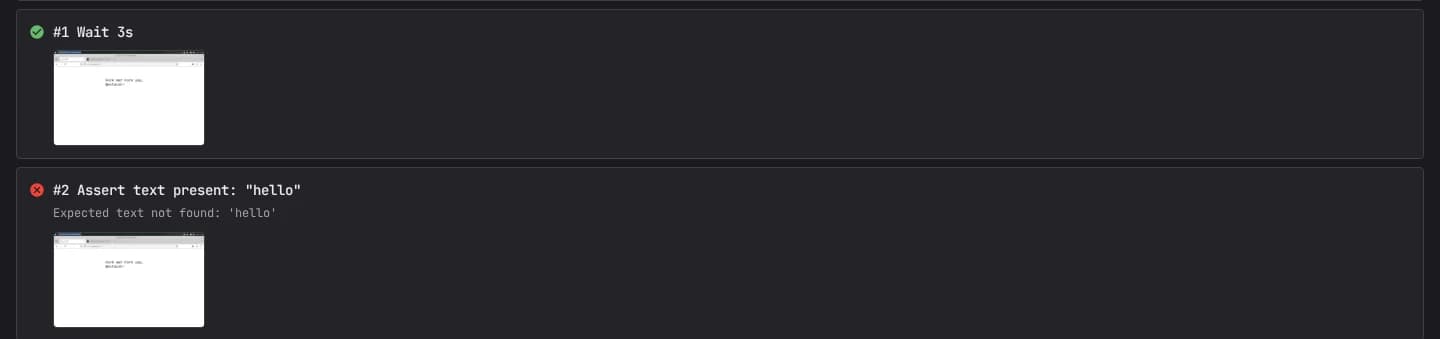
A test that only tells you whether it passed leaves you to reconstruct why. OpenFactory captures the why automatically. Each step records a screenshot at the moment it ran, a short note on what was attempted and what was verified, and a status. Put together, a run report reads like a flipbook of exactly what the test saw and did, in order. When a step fails, its screenshot is right there showing the state of the screen at the instant things went wrong. Frequently you diagnose the bug from the report without ever re-running anything.
Layer the video on top and you have both the frame-by-frame stills and the motion between them. Reports are private by default (screenshots, video, and notes are all gated). A saved-scenario report can be made public only with the explicit public-report option; inspect it for sensitive content first. The point is that the evidence is a side effect of running the test, not extra work you have to remember to collect.
From a one-off check to a permanent test
There is a natural lifecycle here. You start by asking for a check like “does the booking flow still work?” and OpenFactory drives it once and reports back. If it is something you will want to verify again, you promote that run into a saved scenario: a named, reusable test that lives under its app in the Test Panel. From then on it replays on demand, hardens itself for speed, and joins the one-click group re-runs alongside the rest of your suite.
A saved scenario stores the intent of each step and a cache of where things were last time; if the UI shifts, the test can re-resolve a changed target on its next run. That reduces some selector maintenance; it does not establish whether a changed target was the correct one. Review failures, surprising passes, and material UI changes rather than assuming the cache healed them correctly.
How to use it
- Just ask. In chat, describe the workflow and ask OpenFactory to test it; it uses
test_workflowand reports back with a verdict and a video. - Save it as a scenario. Turn a good run into a reusable test with
create_app_scenario, then replay it any time withrun_app_scenario, on its own or as part of a one-click group re-run. - Review in the console. Every run, its steps, and its video live in the Test Panel at console.openfactory.tech.
Visual workflow runs can add useful, reviewable evidence to a broader test strategy. Describe the workflow, save a scenario when repetition is useful, inspect the captured evidence, then re-run the whole suite in one click whenever something changes.
Frequently asked questions
How is this different from a scripted test like Selenium or Playwright?
A vision-driven run can follow visible UI intent without a hand-authored selector for every action. It is also probabilistic and can miss a defect or misread a screen. Keep deterministic API, DOM, accessibility, security, and data-integrity checks where exact behavior matters.
What does the test_workflow tool actually do?
You describe a workflow in plain language; OpenFactory drives a tester VM through a screenshot → reason → act loop and records the run. It returns a run id immediately for polling. The resulting verdict is evidence from that run, not proof that every state, browser, or accessibility path works.
How does it assert that the UI is correct?
Visual recognition can evaluate semantic states in screenshots, including non-text UI, but it can produce false positives and false negatives. Pair it with exact text, URL, command-output, network, accessibility, and application-level assertions when those contracts matter.
Do saved tests use a replay cache?
Saved scenarios can cache resolved elements and reuse them on later runs, falling back to parsing when a cached target no longer matches. That can reduce work, but timing still varies and cache reuse is not a guarantee of speed or correctness. The one-off test_workflow path is separate from saved-scenario replay.
How do tests handle login and 2FA?
A scenario can read an emailed one-time code from an active connected Gmail account. Saved scenario secrets are stored in the platform key store; one-run variable overrides are not persisted. Use dedicated test accounts, least privilege, short-lived credentials, and review the managed integration-provider boundary.
Related reading
Group and re-run your app tests
Organize tests by project and app, and re-run a whole group in one click on a fleet of VMs.
From a git repo to a live URL
Deploy a web app, then have the AI test it at its public URL.
Connect your apps to agents
Connect a mailbox so tests can read one-time login codes during sign-in.
Choose the next validation step
Compare published self-service limits, or scope customer-controlled deployment and fleet requirements through a technical pilot.