
Organize, Queue, and Review App-Test Batches
Organize saved GUI scenarios by project and app, queue scoped background batches, and run up to available tester-pool capacity with explicit isolation and evidence limits.
By the OpenFactory Team · June 18, 2026
The Test Panel organizes saved GUI scenarios by project and app and can queue a scoped background batch. Tests lease machines up to available pool capacity; excess work queues. A green batch means only that its defined scenarios passed in those runs, not that a release is certified.
A test you never re-run is a screenshot of the past. The whole point of a test suite is to run it again (after a deploy, before a release, when a dependency bumps) and see what moved. But re-running a pile of end-to-end GUI tests has always been the painful part: they were a flat list with no structure, you triggered them one at a time, and they fought over a single machine. So people stopped re-running them, and the suite quietly rotted.
The update adds structure, scoped re-run controls, leased tester pools, and a result rollup. The rest of this guide explains those mechanics and the state they do and do not isolate.
Tests live in a tree: Project → App → tests
The Test Panel mirrors how you already think about your work. At the top is a project: a product or initiative like “Knostra.ai.” Inside a project are the apps that make it up. And inside each app are the testswritten for it, each with its own run history. Every test belongs to a project; there is no more “unassigned” limbo. If you create a test without picking a project, it is filed under a default project automatically so the tree always stays complete.
One click re-runs the whole group
Each level of the tree has a Re-run button, and there is a global one at the top. Press the button on the knostra app and its eligible scenarios are queued. Press it on the Knostra.aiproject and eligible scenarios under its apps are queued. Press “Re-run all” and every eligible saved scenario in the owner's scope is queued. Missing prerequisites, invalid scenarios, capacity, or cancellation can still leave individual items skipped or errored.
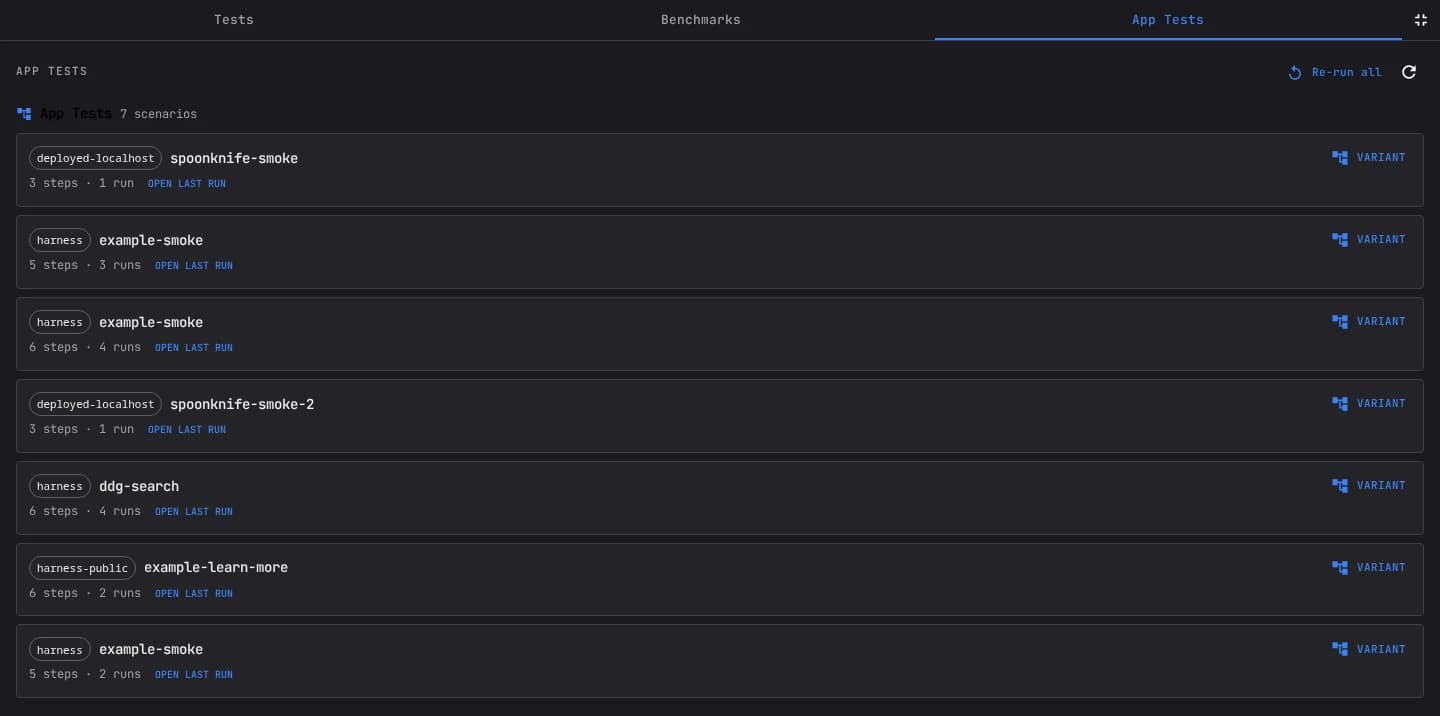
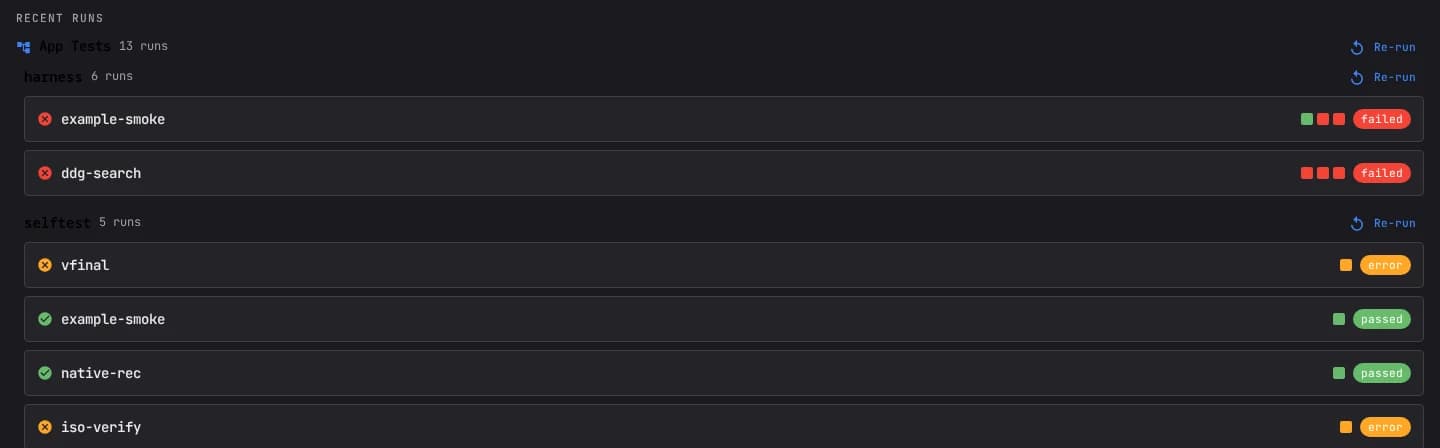
A re-run starts a background batch and hands control straight back to you. A live progress strip shows how many tests have finished, how many passed and failed, and exactly which machine each in-flight test is running on. You can close the tab and the batch keeps going. Cancellation requests stop or skip remaining work and can leave partial evidence, so review each final item rather than assuming a clean boundary. Tests that lack required credentials are reported individually.
A fleet of tester VMs, not one bottleneck
A serialized suite can crawl when all tests wait on one machine. The pool scheduler instead provides each app with a pool of tester VMs. When a batch runs, tests for the same app spread across that app's pool (several at a time) and tests for different app pools can make progress concurrently. Wall-clock time is a measured outcome, not a formula: provisioning, unequal scenario lengths, retries, failures, queue contention, and pool limits all matter.
That lease is also a lock. While a test holds a VM, no other scheduled test should drive it concurrently. Normal tester pools are scoped per user, and a lease admits one scheduled test driver per VM. Expiry and reconciliation recover abandoned leases, but crashes and control-plane failures can still require diagnosis; automatic recovery is not a guarantee that a pool can never wedge.
Fresh tab does not mean fresh identity state
Sharing machines across tests creates a classic hazard: one test leaves a modal open, a form half-filled, or a stale page loaded, and the next test inherits the mess and fails for the wrong reason. OpenFactory closes that door partly with per-run setup and tab teardown. Each scenario opens a fresh tab and closes it at the end. The tester VM and browser profile can persist, however, so cookies, storage, service-worker state, downloads, server-side account state, and external side effects do not disappear merely because the tab closed. Reset the state a scenario depends on or provision a stricter ephemeral boundary.
Trigger it from the console, MCP, or chat
The buttons live in the Test Panel of the OpenFactory console, but everything is also available through the OpenFactory MCP, so an agent can run your suite on a schedule, after a deploy, or because you asked it to in chat. The relevant tools are run_app_test_group, get_app_test_group, and cancel_app_test_group.
Re-run all of the app tests for my "knostra" app and tell me
which ones regressed.

Use run_app_test_group(scope="app", app_name="knostra"), then poll
get_app_test_group(batch_id) until it finishes and summarize the
pass/fail results with a link to each failing run's report.Run history you can actually read
Grouping does more than tidy the panel: it makes history legible. Every test keeps a strip of its recent runs right beside its name, so you can tell at a glance whether a test is solidly green, freshly broken, or flickering between the two. A flickering test is a signal in its own right: it usually means a real race or a genuinely flaky workflow, and seeing the pattern is the first step to fixing it.
Because a test's identity is stable (it is keyed by its app and its name), that history accumulates across commits, deploys, and weeks. The strip becomes a small benchmark of how each workflow has held up over time, rather than a snapshot of the most recent attempt. When something breaks, you are not asking “did this ever work?” You can see the exact run where green turned red, open it, and watch what changed.
Concurrency and tenancy boundaries
The pool model is what makes all of this safe for more than one person. Tester machines are scoped per user and handed out under an exclusive lease. The scheduler is designed so two batches do not concurrently drive the same leased VM; normal pools are also user-scoped. Validate ownership and artifact authorization separately, and remember that shared external accounts or server-side test data can still create cross-run interference.
When a pool is at capacity, additional tests simply queue and become eligible when a machine frees up. Queue timeouts, provisioning errors, cancellation, and service failures remain possible. Increasing a pool limit can improve concurrency, but also increases compute, browser, network, and upstream-service load; measure the effect before treating it as a throughput commitment.
Choosing the right scope
The three re-run scopes map cleanly onto how you actually work. Re-run a single app while you iterate on it: the tightest loop, fastest feedback. Re-run a whole project before you cut a release that spans several of its apps, so you catch a regression in one corner before it ships with the rest. And re-run everything on a cadence (nightly, or after a dependency bump) to keep the entire surface honest.
A batch runs in the background and reports per-item status. An agent can request and summarize it, but scheduling, notification delivery, failure triage, and release policy still need explicit ownership. Require the agent to link failed and skipped runs instead of reducing partial results to a single green/red sentence.
The same engine, end to end
It is worth being clear about what the group re-run does and does not do. It does not reimplement testing. Each test in a batch runs through the exact same engine described in our companion post on AI-in-the-loop visual testing: a fresh browser tab, the app driven by sight, assertions checked visually, and the whole run recorded. What the batch adds is orchestration: which tests run, on which machines, in what order, and how the results roll up. That separation is deliberate: the way a single test behaves is identical whether you launch it alone or as one of fifty. In both cases, green is scoped to the scenario's assertions, environment, revision, and run evidence.
Why it matters
Testing only pays off when it is cheap to repeat. By giving tests a project structure, scoped batch controls, bounded parallelism, and explicit leases, OpenFactory reduces the mechanics of repeating a suite. Review failures, skips, environment state, and evidence before using the batch as a release signal.
Next, see how each test actually runs (the AI drives your app by sight and records a replay you can scrub) and how to deploy an app to a live URL you can point these tests straight at.
Frequently asked questions
How are app tests organized now?
In a three-level tree: Project, then App, then the individual tests. A project like 'Knostra.ai' contains one or more apps, and each app holds the tests written for it. Every test belongs to a project, so nothing floats around unattached and the panel mirrors how you actually think about your products.
What do the re-run buttons do?
There are three scopes. 'Re-run all' queues eligible saved scenarios you own; project and app controls narrow that selection. Each starts a background batch you can watch and cancel. Missing prerequisites, invalid scenarios, or cancellation can produce skipped or errored items.
Do tests run one at a time?
A batch can lease multiple tester VMs up to configured pool capacity. Tests beyond that capacity queue, and actual wall time depends on provisioning, scenario duration, retries, failures, and other demand. Do not promise a fixed speedup without a dated run record.
Can two people run tests at once without stepping on each other?
The scheduler uses exclusive leases and user-scoped normal pools to prevent concurrent drivers on one VM. That is process isolation, not a claim that browser-profile state is fresh: scenarios open fresh tabs, while cookies or other persistent profile state can remain unless the scenario resets them.
How do I trigger a group re-run?
From the Test Panel in the OpenFactory console with the re-run buttons, or programmatically through the OpenFactory MCP with run_app_test_group, get_app_test_group, and cancel_app_test_group. You can also just ask an agent in chat to re-run a project's tests.
Related reading
AI-in-the-loop visual testing
How each test actually runs: the AI drives your app by sight, asserts with image recognition, and records a replay.
From a git repo to a live URL
Deploy a web app to a public URL, then point these tests straight at it.
Connect your apps to agents
Give your agents the tools they need to drive real workflows during a test.
Choose the next validation step
Compare published self-service limits, or scope customer-controlled deployment and fleet requirements through a technical pilot.